How to Schedule Social Media Posts Across Multiple Platforms
Connect every account to one scheduler, create the post once, adapt it per network, get it approved, and schedule each version for its best time. Postqued does all of this for $9/month on the Solo plan: 10 platforms (TikTok, Instagram, YouTube Shorts, Facebook, LinkedIn, Pinterest, Threads, Bluesky, Mastodon and X), unlimited posts, and API + MCP access. Every plan starts with a 7-day free trial, so you can schedule your first campaign before you pay.
What do you need before scheduling?
- The accounts and Pages you manage, connected once
- The final campaign message and link
- Images or video in the formats each network accepts
- The time zone and publish window for each audience
- Any required disclosures (paid partnership, AI-generated content)
- The person who gives final approval
How do you schedule across platforms in Postqued?
1. Choose the workspace
Use one workspace per brand or client so its accounts, media, drafts and approvals stay together. Pro and Agency include unlimited workspaces and team seats.
2. Connect each social account
Connect every destination through the network’s own login screen. Check that the profile, Page, channel or board is the right one, and remove duplicate connections that could be picked by mistake. If a login expires, reconnect that account; the rest of the campaign stays intact.
3. Create the post and add media
Write the source caption and upload the media. Use assets good enough for the most demanding destination, then check aspect ratio, duration and carousel limits per network.
4. Select the destination accounts
Pick the accounts that should get the post. Each destination is its own target: one can fail while the others publish.
5. Customize each platform version
Adapt each version instead of forcing one generic post onto every network. Check caption length, media, link, first comment and reply settings per target.
| Platform | What Postqued publishes | Check before scheduling |
|---|---|---|
| TikTok | Videos and photo posts up to 35 images, or send to TikTok drafts | Privacy, interaction and disclosure settings |
| Feed posts, carousels, Reels, Stories, first comment | Media is required; choose the placement | |
| Page text, link, photo, video and Reel posts, first comment | Confirm the Page and post type | |
| Threads | Up to 20 media and 500 characters, first comment | Caption length and reply controls |
| Text up to 3,000 characters, one image, or an article or link post, first comment | No video | |
| YouTube | Shorts only, one video per post | Vertical, short video |
| X | Text, up to 4 images or a GIF, or video, first comment | 280-character limit |
| One image or video Pin to a board | A board is required | |
| Mastodon | Text with up to 4 media attachments, first comment | 500-character limit |
| Bluesky | Text and image posts | Images only, no video |
6. Approve the exact version
Send each version through review before scheduling. Postqued approvals are revision-aware: the approved snapshot is exactly what publishes. Invite clients or other outside reviewers by email.
Approve the version that will publish, not the idea from before the last edit. If the caption or media changes after approval, it goes back for review.
7. Choose the publishing times
Networks do not need to publish at the same moment. Postqued lets you pick each time in a specific time zone. Consider:
- the audience’s time zone;
- whether one network should lead the launch;
- who will answer comments after it goes live;
- embargoes and launch times.
Start from benchmark windows such as the best time to post on social media guide, then test them against your own account history for four weeks.
8. Run a final check and schedule
- Right workspace and client
- Right accounts
- Right media and versions
- Approvals done
- Right dates, times and time zone
- Disclosures set and links tested
The post then appears on the shared calendar, where you can drag it to a new time.
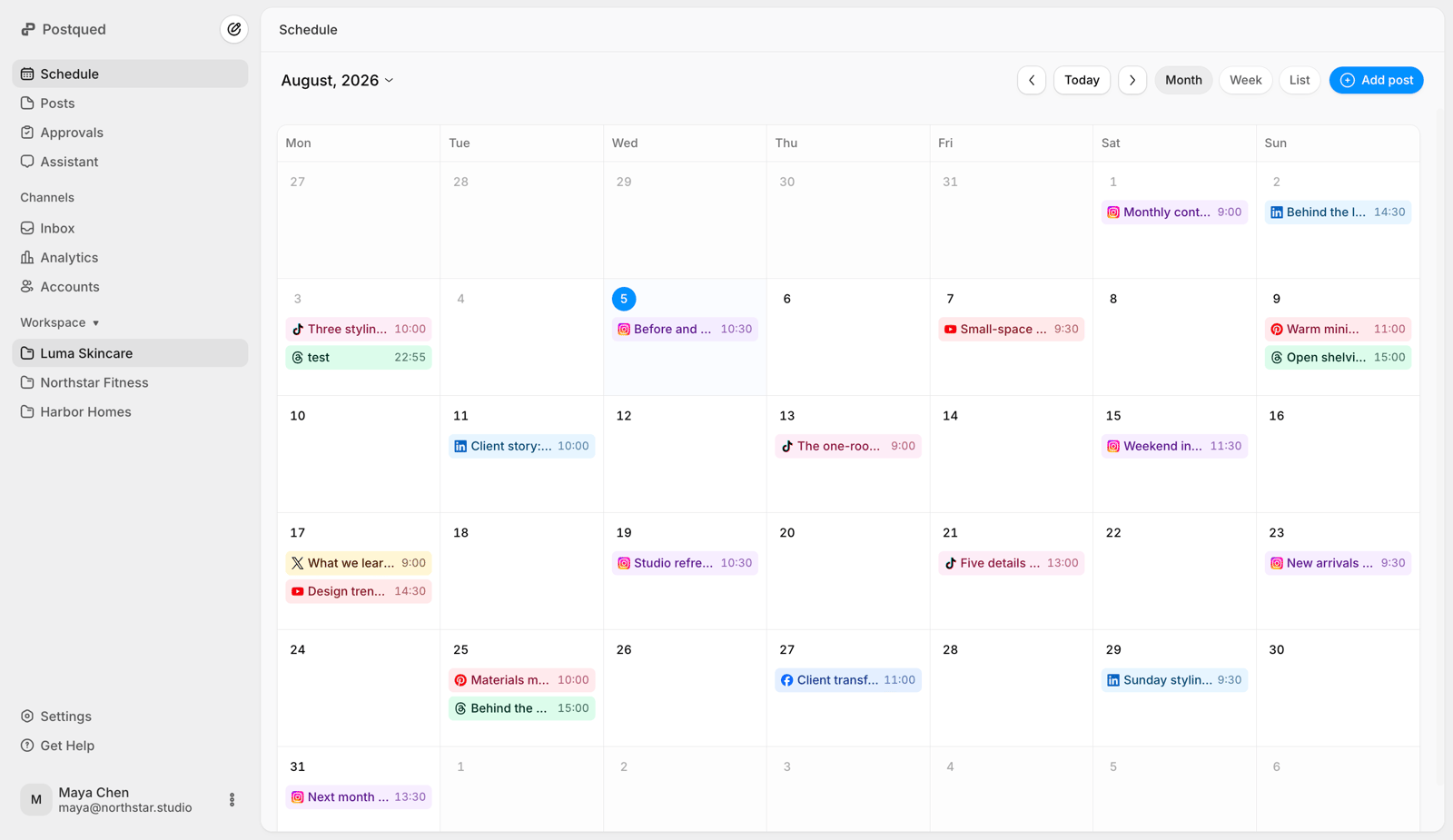
9. Check results and reply to comments
After the publish time, confirm each target went live and fix any failed one. Reply to comments from the Engagement Inbox (Facebook, Instagram, Threads, X, LinkedIn and Mastodon). Compare results in Postqued analytics, which covers TikTok, Facebook, Instagram, Threads and YouTube.
How do you automate multi-platform scheduling?
Use the Postqued REST API or MCP server (62 tools) when posts come from your own system or an AI agent like Claude or ChatGPT. Both are on every plan.
- Create an organization API key.
- Connect social accounts once in the dashboard.
- Upload the media.
- Build the request with explicit platform and account targets.
- Validate it with
dryRun. - Publish with a unique
Idempotency-Keyheader, usingdispatchAtto schedule. - Poll the publish status until every target finishes.
See the Postqued API and MCP workflow and the API v2 documentation.
Native schedulers or one multi-platform scheduler?
| Approach | Works when | Main limitation |
|---|---|---|
| Native platform tools | One or two networks, one person | Separate calendars, logins and analytics |
| Spreadsheet plus manual posting | You need a plan but post by hand | Nothing validates or publishes for you |
| Multi-platform scheduler (Postqued) | Several accounts, recurring campaigns, approvals | Needs per-network setup |
| API or agent workflow | Content comes from another system | Needs an owner for credentials and monitoring |
A multi-platform scheduler saves the most time when it replaces account switching, duplicate uploads, manual status checks and scattered approvals.
What are the most common cross-platform scheduling mistakes?
- One identical caption everywhere. A caption that fits LinkedIn is too long for X.
- Assuming every network takes the same media. Instagram requires media, YouTube requires a vertical video, Pinterest requires a board.
- Treating “scheduled” as “published.” Expired logins, media processing or a platform rejection can still stop a post. Check the status.
- Editing after approval without another review. Approval only counts for the final version.
- Giving automation more access than it needs. Scope API keys to the organization and never share social passwords with an agent.
Final recommendation
Use Postqued to plan, adapt, approve, schedule and track posts across 10 networks from one calendar. Solo costs $9/month for 5 accounts with unlimited posts; Creator ($29) covers 20 accounts; Pro ($49) adds unlimited workspaces and team seats. Every plan includes the Engagement Inbox and API + MCP access.
Running one brand? Solo at $9/month covers five accounts; teams with reviewers fit Pro at $49. Start a 7-day free trial.