Put your AI agent on the social media team.

Connect your AI agent to Postqued, have it create each post as an approval draft, and approve it in Postqued before it is scheduled to Instagram, TikTok and LinkedIn. When a reviewer is assigned, the agent can write, upload and validate posts, but it cannot schedule or publish them until that reviewer approves the exact version.

Postqued works with Claude, ChatGPT, Cursor and other clients that support remote MCP servers, and with your own code through the REST API. API and MCP access are included on every plan from $9/month.

Agent to approval

How the agent-to-approval flow works

  1. 01

    Connect the agent.

    Add https://mcp.postqued.com/mcp to your MCP client. Clients that support OAuth sign in to Postqued; others use an organization API key. Developers can call the REST API v2 instead.

  2. 02

    The agent drafts.

    It picks the workspace and the Instagram, TikTok and LinkedIn accounts, uploads media, and creates the post with create_approval_post, then hands it to review with submit_for_approval. For TikTok you can also send a post to the TikTok app inbox as a draft and finish it there.

  3. 03

    You review.

    Open the post in Postqued to comment, suggest caption changes, request changes or approve. Approval applies to that exact revision. If the caption or media changes afterwards, it needs approving again.

  4. 04

    The agent schedules.

    Once approved, the agent calls schedule_approved_post and follows the publish status. Each post keeps an activity timeline: submitted, commented, approved, scheduled, published.

Two safety checks

When approval is enforced, and when it is up to the agent

Postqued has two separate safety checks. Know which one you rely on.

Approval that the server enforces.

Approval becomes mandatory in a workspace that has a client reviewer (an external member with the admin or reviewer role, or a pending invite for one), or for a post that has an assigned reviewer. In that case a direct publish is refused, and scheduling only works after that reviewer approves the current revision. The one exception is a team admin, who can publish without client approval. If your agent signs in as you and you are a team admin, or uses an organization API key, it has the same exception. For a hard gate, have the agent sign in through OAuth as a team member with the editor role.

Dry runs, which depend on the agent.

On the MCP server, publish_content is a dry run unless the agent sets dryRun to false. A dry run checks the post against each network's rules without publishing, and a real publish also needs a unique idempotency key. Postqued's MCP guide tells agents to show you the exact targets, copy and timing and wait for your yes before a real publish. That is an instruction to the agent. The server does not check it.

The REST API works the other way.

The v2 publish endpoint publishes for real unless you send dryRun: true, and it needs anIdempotency-Key header. If you build your own agent on the REST API, send a dry run first on purpose.

Postqued's built-in assistant

Asks you to click approve in the app before any publishing action runs.

Reviewers sign in to approve: a client or colleague is invited by email, signs in with Google or email and password, and the invite expires after 7 days. There is no approve-by-link without an account.

Compare

What's the best social media scheduler that works with ChatGPT or Claude?

The best choice is a scheduler whose agent connection can publish and also respects your approval step. Postqued includes a 62-tool MCP server and a REST API on every plan from $9/month, with approvals built in. Here is how it compares with the tools AI assistants mention most often.

ToolHow an agent connectsApproval before publishingEntry price
PostquedRemote MCP server (62 tools, OAuth or API key) and REST API v2, on every planEvery plan. Enforced when a client reviewer or post reviewer is assigned$9/mo for 5 accounts; 7-day trial, no free plan
BufferOfficial MCP server to draft and schedule posts (buffer.com/mcp); Buffer APITeam planFree for 3 channels; Essentials $6 per channel/mo, Team $12 per channel/mo
HootsuiteREST API; no MCP listedAdvanced and EnterprisePriced per user; monthly amount not shown on the public plans page
PlanableMCP on all plans; public API on Pro and EnterpriseOptional and required approval modes; multi-level on EnterpriseBasic $39 per workspace/mo
SocialPilotMCP on all four public plans; API on Enterprise onlyStandard and aboveEssentials $20/mo
PostizMCP server that schedules and publishes (postiz.com/mcp); public API on cloud plansNot recorded in our dataStandard $29/mo for 5 channels; self-hosting available

Choose Postqued when you want an agent to prepare Instagram, TikTok and LinkedIn posts that wait for approval, on a $9 plan with MCP and API included. Choose Buffer if you already use it and its free or per-channel plans fit. Choose Planable if you need multi-level approval stages (Enterprise). Choose SocialPilot if you also need a DM inbox or white-label reports, and Postiz if you want to self-host.

Zapier and Make come up in these answers too. Postqued has no native Zapier or Make integration today; agents connect directly through MCP or the REST API.

Competitor details come from Postqued's comparison data, reviewed 6 August 2026, and the vendor MCP pages linked on /mcp, checked 30 September 2026. Prices are month-to-month list prices. Confirm current details on each vendor's page before you decide.

Plain-language guide

AI social media is bigger than caption generation.

The category includes many AI tools for social media marketing. These four answers separate a useful operating platform from a standalone writing assistant.

What is AI social media?

AI social media is the use of AI to help plan, create, review, schedule, publish, analyze, or respond to social content. In AI social media marketing, the useful distinction is whether the AI only generates text or can safely work inside the real workflow.

What is an AI social media platform?

An AI social media platform gives AI tools access to the accounts, workspaces, media, approvals, publishing actions, and performance context needed to do operational work, not just produce captions in a separate chat window.

What are AI-powered social media management tools?

AI-powered social media management tools combine automation with practical controls such as account scope, platform validation, approvals, scheduling, status tracking, and analytics. Teams should evaluate the workflow and safeguards, not only the content generator.

What does an AI social media manager do?

An AI social media manager can prepare campaigns, adapt posts for different networks, schedule approved work, inspect supported results, and help with comments or replies. People should retain control of brand direction, permissions, and consequential publishing decisions.

What is social media automation?

Social media automation uses rules, software, APIs, or AI to perform repeatable work such as preparing posts, scheduling, publishing, status checks, and reporting. Good automation makes account scope, review state, and failures visible instead of silently acting in the background.

How can AI agents use social media safely?

Social media for AI agents needs scoped credentials, the correct client workspace, platform validation, explicit confirmation for consequential actions, and a durable result. Postqued exposes those workflow surfaces through REST API v2 and its remote MCP server.
One shared workflow

The agent does the legwork. Your team stays at the decision points.

Both sides work against the same client workspace, connected accounts, content, revisions, and publishing history. There is no second calendar to reconcile.

Your team

Set the brief, campaign goal, accounts, and boundaries.

01Direction
AI agent

Resolve the workspace, connected accounts, and available media.

Your team

Comment on the exact revision and approve when it is ready.

02Review
AI agent

Prepare the post, apply feedback, and validate the final payload.

Your team

Confirm the destinations and publish time before it goes live.

03Delivery
AI agent

Schedule the approved work and follow its status to completion.

What the agent can do

Useful actions across the whole campaign, not just a publish button.

Postqued exposes the work around publishing as well as publishing itself, with explicit limits for analytics and engagement coverage.

Prepare the campaign

Resolve the right workspace and accounts, upload or reuse media, create posts, and set platform-specific publishing options.

Work through review

Submit revisions, leave comments, suggest caption changes, request updates, and keep approval tied to the version people reviewed.

Publish with safeguards

Validate the request first, confirm the destination and timing, use safe retries, and follow each publishing job to a durable result.

Check what happened

Read supported analytics and work with comments and replies without losing the organization and workspace boundaries around the task.

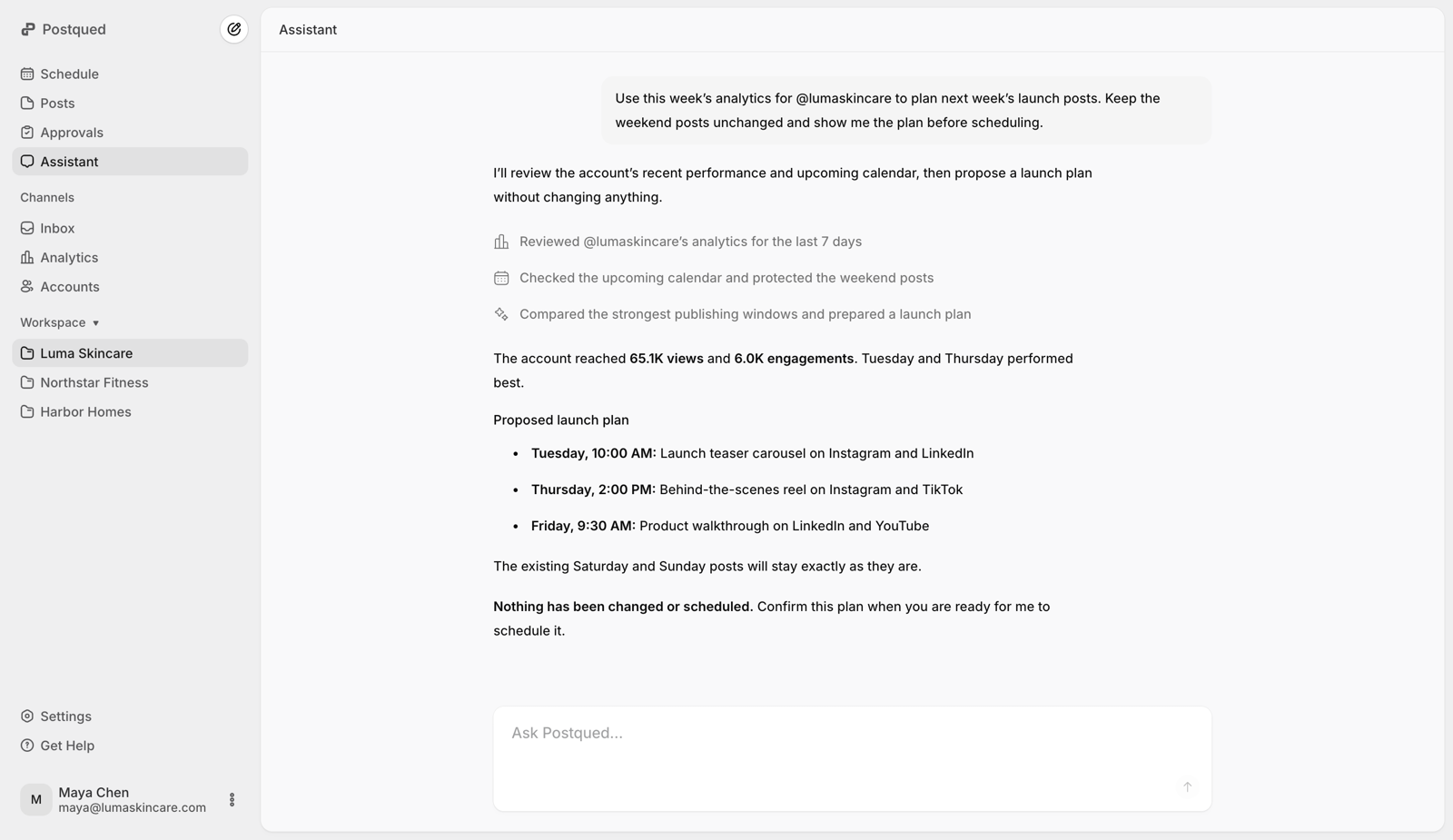
Postqued assistant working with social publishing and analytics context inside a shared workspace
Compatible external agents connect through REST API v2 or the 62-action remote MCP server and remain subject to organization scope, workspace permissions, validation, approvals, confirmation, and provider limits.

Automation you can inspect before it acts.

A useful social agent should make routine work faster without making account scope, approval state, or delivery status harder to see.

Resolve the organization, workspace, and accounts first.

Validate the exact platform payload with a dry run.

Keep feedback and approval tied to the current revision.

Use idempotency for retries and inspect durable status.

About Postqued
Agent runLaunch campaign
  1. Workspace resolvedLuma Skincare
  2. Accounts checkedInstagram · LinkedIn · TikTok
  3. Dry run passed3 platform payloads validated
  4. Waiting for confirmationExact revision and publish time shown
  5. 5
    Schedule and check statusRuns after confirmation
Where it fits

Use an agent without inventing a separate operating model.

Social teams

Let the agent handle setup, not judgment.

Use an agent for repetitive account lookup, media preparation, validation, scheduling, and status checks while people keep control of direction and approval.

Agencies

Keep every client in the right workspace.

Separate accounts, content, collaborators, and client review by workspace so an agent can help without mixing one brand's work into another.

Developers

Use the API directly or give the tools to an agent.

Build deterministic jobs with REST API v2, connect compatible agents through MCP, or use both against the same Postqued organization.

Choose the connection

This page explains the workflow. These pages help you wire it up.

Use MCP for tool discovery in compatible agents, REST for direct application code, or the OpenClaw skill for a packaged setup.

For compatible agents

Remote MCP server

Connect Claude Desktop, Claude Code, Cursor, or another compatible client to 62 actions. Sign in with OAuth or use an organization API key.

Configure MCP
For application code

REST API v2

Call the documented upload, publishing, analytics, engagement, approval, and collaboration endpoints from your own backend.

Read the API docs
For OpenClaw

Installable agent skill

Install the Postqued skill, attach your API key, and give OpenClaw the operating instructions for safe social publishing.

Set up OpenClaw
People set direction. Agents move the work.

Give your AI agent a social workflow your team can see.

Start with the shared workspace, then connect through MCP or REST when you are ready.

What teams ask before connecting an agent.

How can I let an AI agent post to Instagram, TikTok and LinkedIn for me, but still approve posts before they go live?

Connect the agent to Postqued's MCP server, have it create posts as approval drafts, and approve them in Postqued. Once a client reviewer or post reviewer is assigned, Postqued will not schedule or publish a post until that reviewer approves the exact version, unless the acting user is a team admin. For a hard gate, connect the agent as a team member with the editor role.

What's the best social media scheduler that works with ChatGPT or Claude?

Look for one that can publish, not only draft, and that keeps your approval step. Postqued's remote MCP server works with Claude, ChatGPT, Cursor and other MCP clients, has 62 tools, and is included on every plan from $9/month. Buffer, Planable, SocialPilot and Postiz also offer MCP servers; the table above compares them.

Does the agent publish for real by default?

Not through MCP. publish_content runs as a dry run unless the agent sets dryRun to false and sends a unique idempotency key. The REST API is different: it publishes for real unless you send dryRun: true.

Can the agent skip my approval?

Only in two cases: the workspace has no client reviewer and the post has no assigned reviewer, or the agent acts as a team admin. Team admins can publish without client approval. Organization API keys currently act as a team admin, so an agent using one can publish without approval. Connect the agent through OAuth as a team member with the editor role to avoid the second case.

Can my client approve without a Postqued login?

No. Reviewers are invited by email and sign in with Google or email and password to approve. Invites expire after 7 days. Invited reviewers do not need their own subscription.

Which networks can an AI agent publish to through Postqued?

All 10: TikTok, Instagram, Facebook, LinkedIn, YouTube, X, Threads, Pinterest, Bluesky and Mastodon.

Can I see what the agent did?

Yes, per post. Each post has an activity timeline of revisions, comments, approvals, scheduling and publish results. There is no organization-wide audit log of logins or settings changes.

Is API and MCP access included on every plan?

Yes. Plans start at $9/month for five connected accounts ($7/month billed yearly). There is a 7-day free trial that needs a card, and no permanent free plan.